

Claude Skills vs Agents vs MCP: Which One You Actually Need
Skills, subagents, MCP, plugins, slash commands, and Projects all sound like they compete for the same job. They do not. This page is the decision table, a worked example built two ways, and the six skills to start with today.
Quick verdict
Claude skills vs agents vs MCP is not really one question. It is six overlapping options, skills, subagents, MCP connections, plugins, slash commands, and Projects, and most teams reach for the wrong one first. The short version: default to a skill for anything you do more than once, escalate to a subagent only when a task is too long or tool-heavy to run inline, connect MCP only when Claude needs a live line into a system you actually run, and package the rest as a plugin once more than one teammate needs it. The decision table and the worked example below make that call concrete.
Claude skills vs agents vs MCP: the decision table
Six building blocks, one row each. Read down the "use it when" column first: it is the fastest way to find the row that matches the task in front of you.
| Building block | What it is | Use it when | Cost & latency | Team packaging |
|---|---|---|---|---|
| Skills | A reusable method: a SKILL.md file with a name, a description, and numbered instructions Claude follows. | You do the same task often and want Claude to run the same method every time, without re-explaining it. | Loads into the turn you are already in. No separate process, no extra model call. | Drop the file into a Project, a repo skills folder, or a plugin. The easiest thing to hand a teammate. |
| Subagents | A specialist Claude delegates to: its own system prompt, its own tool access, its own context window. | The task is long or tool-heavy enough that running it inline would flood your main conversation. | A second context window plus its own tool-call loop, so it costs more tokens and time than a skill run inline. | A Markdown file with YAML frontmatter, checked into a repo's agents folder or bundled in a plugin. |
| MCP | An open protocol connecting Claude to an external system, a database, a ticketing tool, a CRM, through a running server. | Claude needs live, authenticated access to a real system beyond its own text and file tools. | Mostly upfront: standing up and hosting the server. Each call adds a network round trip on top of the model call. | Point the whole team at one hosted server, instead of shipping the connection logic to each person. |
| Plugins | An installable bundle that can combine skills, subagents, MCP servers, and slash commands into one package. | You want to ship several of the above together as one install rather than separate copy-paste steps. | No cost of its own. Cost follows whatever it bundles. | The distribution answer for a team: one install command instead of five files handed around individually. |
| Slash commands | A saved shortcut, a forward slash and a name, that expands to a stored prompt or short instruction. | You type the same instruction often and want it in two keystrokes instead of a paragraph. | None beyond the prompt it expands to. No separate context, no extra call. | A single Markdown file per command, shared the same way as a skill. |
| Projects | A workspace that groups conversations under one set of reference documents and instructions. | Several conversations should share the same background, style guide, or source material without repeating it. | Adds the project's documents to context at the start of every conversation inside it. A fixed cost per turn, not per call. | Share the project itself. Anyone added sees the same knowledge base immediately. |
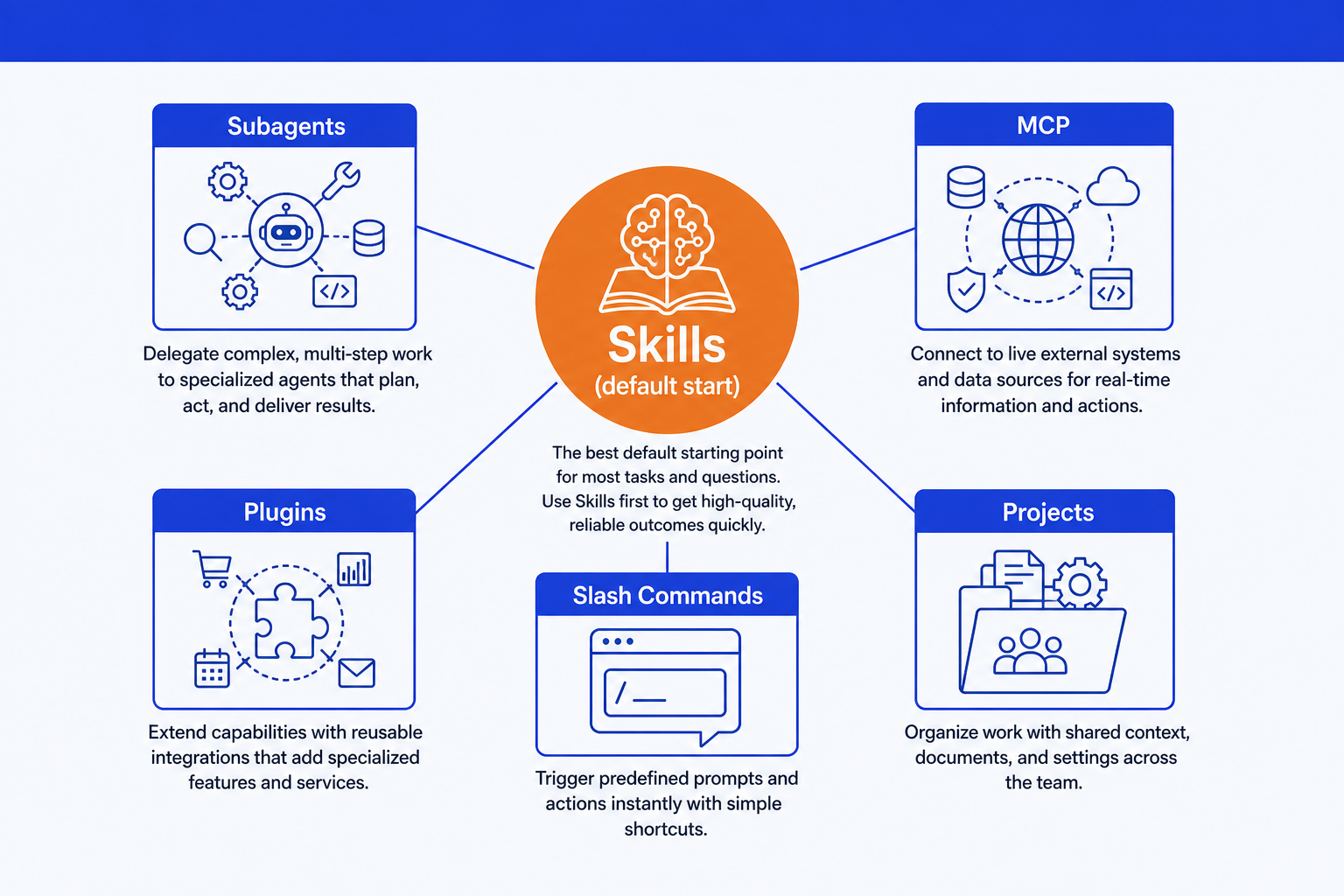
What each one is good at, and where it breaks down
None of these six are competing tools. They are six answers to different questions, and knowing where each one stops being the right call matters as much as knowing where it starts.
Skills
Encoding a method once so Claude runs it the same way every time you invoke it.
A one-off task never earns the setup. Write it out once and move on.
Subagents
Keeping a long research or audit job out of your main conversation.
Overkill for a five-line task. The extra context window is not free.
MCP
Giving Claude a live, authenticated line into a real system you already run.
Nothing to connect to yet, or a connection only you will ever use.
Plugins
Handing a whole team one install instead of five files to copy by hand.
A single skill used by one person does not need a wrapper around it.
Slash commands
Your own two-keystroke shortcut for a prompt you type constantly.
Sharing one team-wide loses to a skill, which travels with the file.
Projects
Grounding a cluster of conversations in the same reference material.
Step-by-step, repeatable procedure is a skill's job, not a project's.
One consulting task, built two ways
Take a real task: a competitive landscape teardown for a mid-market acquisition target. Here is the same job built as a skill, then as a subagent, so the difference is concrete instead of abstract.
As a skill
The skill assumes the inputs are already in front of you: filings, a pricing page, a few competitor websites pasted into the chat. It runs inline, in the conversation you already have open.
skills/competitive-landscape-teardown/SKILL.md
---
name: competitive-landscape-teardown
description: Score named competitors against a target on cost, feature depth,
  and go-to-market. Use when the inputs (filings, pricing pages, websites) are
  already available and the output is a one-page teardown.
---
1. Read every source the user pasted in; do not search for new ones.
2. Score each competitor on cost, feature depth, and go-to-market (1-5).
3. Flag any claim with no supplied source as [UNVERIFIED].
4. Output a one-page teardown: scores, three lines of evidence per row.
Invoked as: "Run the competitive-landscape-teardown skill on these three competitors, sources attached."
As a subagent
The subagent assumes the opposite: nobody has pasted anything in yet, and Claude has to go find the sources itself across a dozen live pages before it can even start scoring.
.claude/agents/competitive-landscape-agent.md
---
name: competitive-landscape-agent
description: Use PROACTIVELY when a teardown needs live research across many
  competitors with no sources supplied yet.
tools: WebSearch, WebFetch, Read
---
Search for each named competitor, fetch pricing and product pages, extract
cost, feature depth, and go-to-market evidence, score 1-5, and return only
the finished teardown with sources cited. Do not report intermediate pages.
Invoked as: "Have the competitive-landscape-agent do a live pass on these five competitors and report back."
The skill is faster and cheaper when the inputs already exist. The subagent earns its extra context window when Claude has to go find those inputs itself: a dozen searches and page fetches would otherwise fill your main conversation with intermediate reads you never wanted to see. That is the actual test, not which approach sounds more advanced. For a fuller example of subagents built into a whole workflow, see 67 autonomous strategy agents for Claude.
Cost and latency, side by side
A skill adds basically nothing beyond the tokens of its own instructions, because it runs in the model turn you are already spending. A subagent costs more: a fresh context window means paying for its own instructions and its own tool-call loop, on top of the summary it hands back to your main thread. That is worth it exactly when the work would otherwise fill your main conversation, and a poor trade when it would not.
MCP's cost sits mostly at setup and hosting, not per call. The per-call add is a network hop across the protocol, small compared to the integration work of standing the server up in the first place. Slash commands and plugins carry no cost of their own, they inherit whatever they expand to or bundle. A Project loads its documents on every conversation inside it, a fixed tax that shows up per turn instead of per call.
The packaging decision for a team
A single analyst can get away with a folder of personal skills. A team cannot, and the packaging choice is where most teams either build something everyone actually uses or something nobody remembers exists.
Start with a skill for anything one person does more than a couple of times. It is the cheapest to build and the easiest to hand to a teammate.
Move to a subagent only when a job would flood the main conversation with search results, file reads, or long drafts. That is the real bar, not how advanced it sounds.
Reach for MCP when the work needs a live line into a system you run, not for anything Claude's own tools already cover.
Package into a plugin once a team is sharing more than one or two of the above, so it is one install instead of five files handed around.
Use a Project for shared background, past deliverables, a style guide, not for a shared procedure. That is what a skill is for.
Once a skill earns its place, write it properly rather than reprompting from scratch each time. The Claude Skill Factory for Strategy is a repeatable method for building your own. For the broader picture of how skills, prompts, and slide workflows fit together, see the consultant's guide to Claude.
Six Claude skills to start with
Most teams should start on the skills row of the table above. Here are 6 real, generic consulting skills, free to download, so the default has something to point at instead of staying theoretical. Pair them with our Claude skills for slide design once the analysis is ready to become a deck.
Download all 6 skills
One zip, one folder per skill. Free, no signup.
Competitive Landscape Teardown
Use when: You need a one-page read on how a target stacks up against named competitors
Output: A scored teardown across cost, feature depth, and go-to-market, with unsourced claims flagged
Client Update Memo
Use when: A status update needs to go out and the facts are scattered across notes and threads
Output: A short memo: what happened, what changed, what is next
Meeting Notes to Action Items
Use when: Raw meeting notes need to become a tracked list before anyone forgets what they owned
Output: A table of owner, action, and due date pulled straight from the notes
Decision Memo Writer
Use when: A recommendation needs to go to someone who will approve or reject it, not just read it
Output: Options considered, the recommendation, and what saying yes commits the reader to
Workstream Status Rollup
Use when: Several workstreams need to become one weekly status view
Output: A single RAG-status rollup with one line per workstream
Slide Narrative Outline
Use when: A deck needs a spine before anyone opens PowerPoint
Output: A page-by-page outline with one governing thought per page
Setup guide
Download the skills pack
The zip contains all 6 skills, one folder per skill. Each is a single SKILL.md file. Unzip it anywhere and keep the whole set, or pull out just the folders you need.
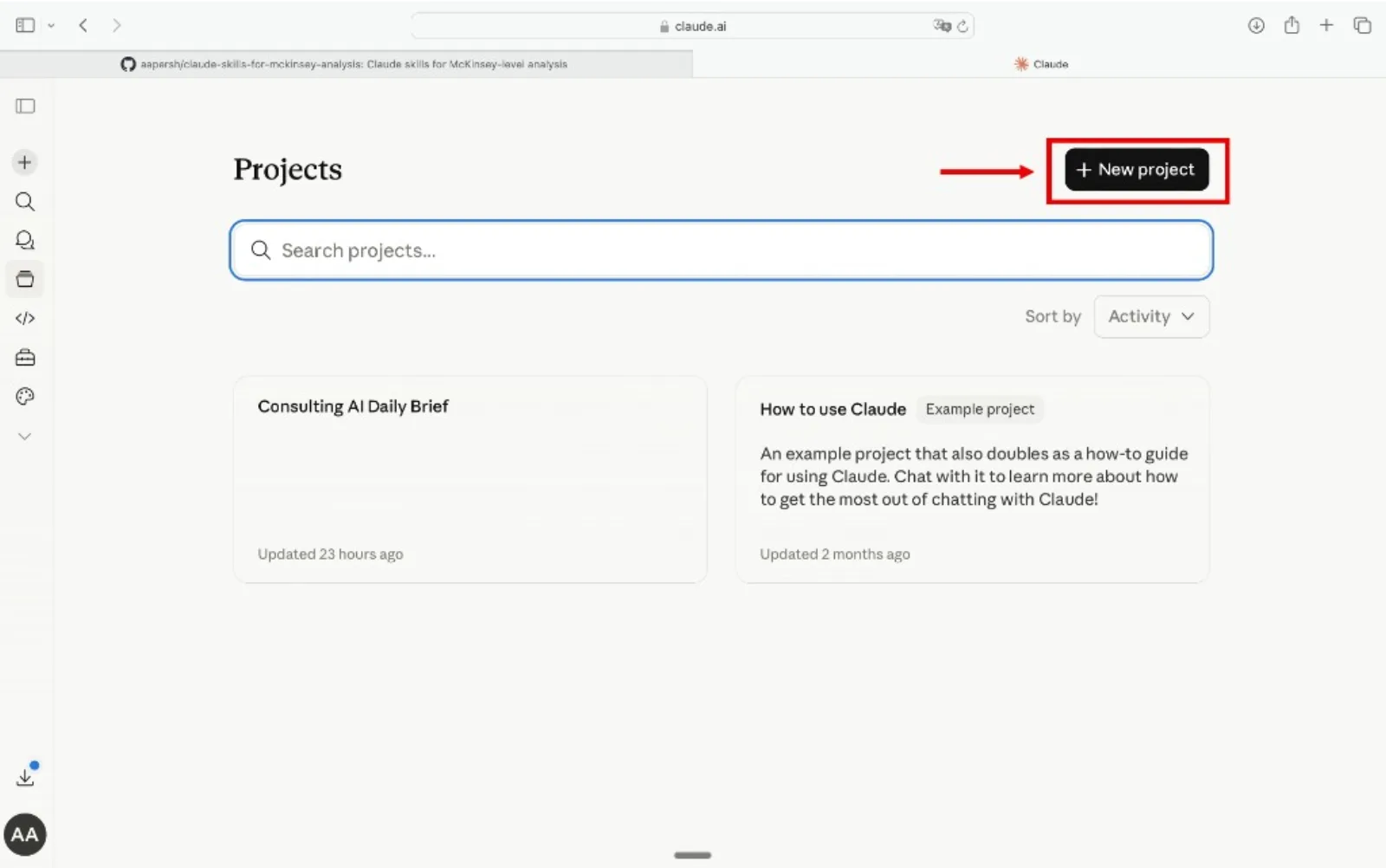
Create a Claude Project
Go to claude.ai, open the left sidebar, click Projects, then Create Project. Name it something like "Consulting Skills" so you can reuse it every week.
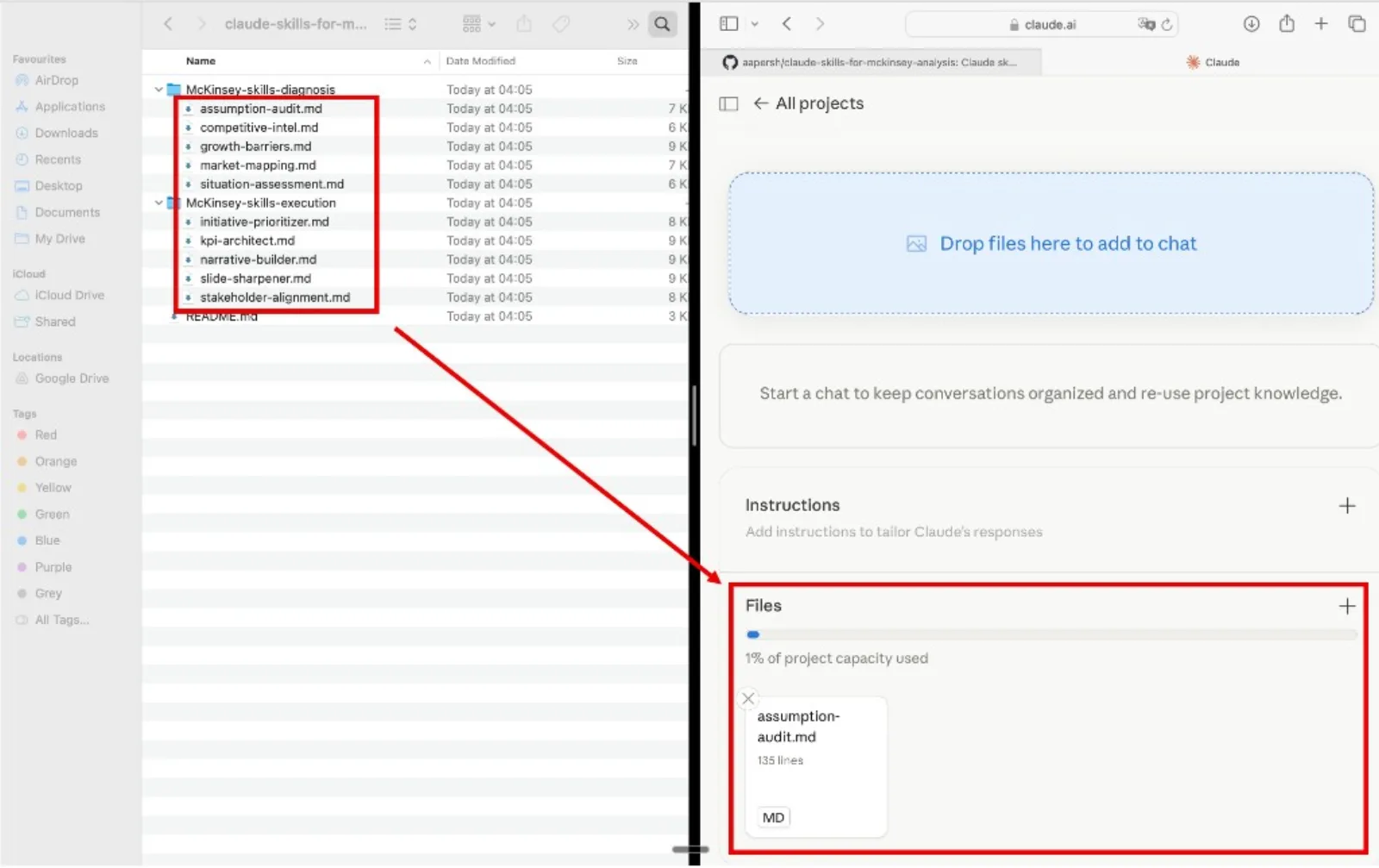
Add the skills as Project knowledge
Inside the project, open Project knowledge, click Add content, and upload the .md files. Add one skill, one part of the pack, or all 6. Claude references them automatically in every conversation inside that project.
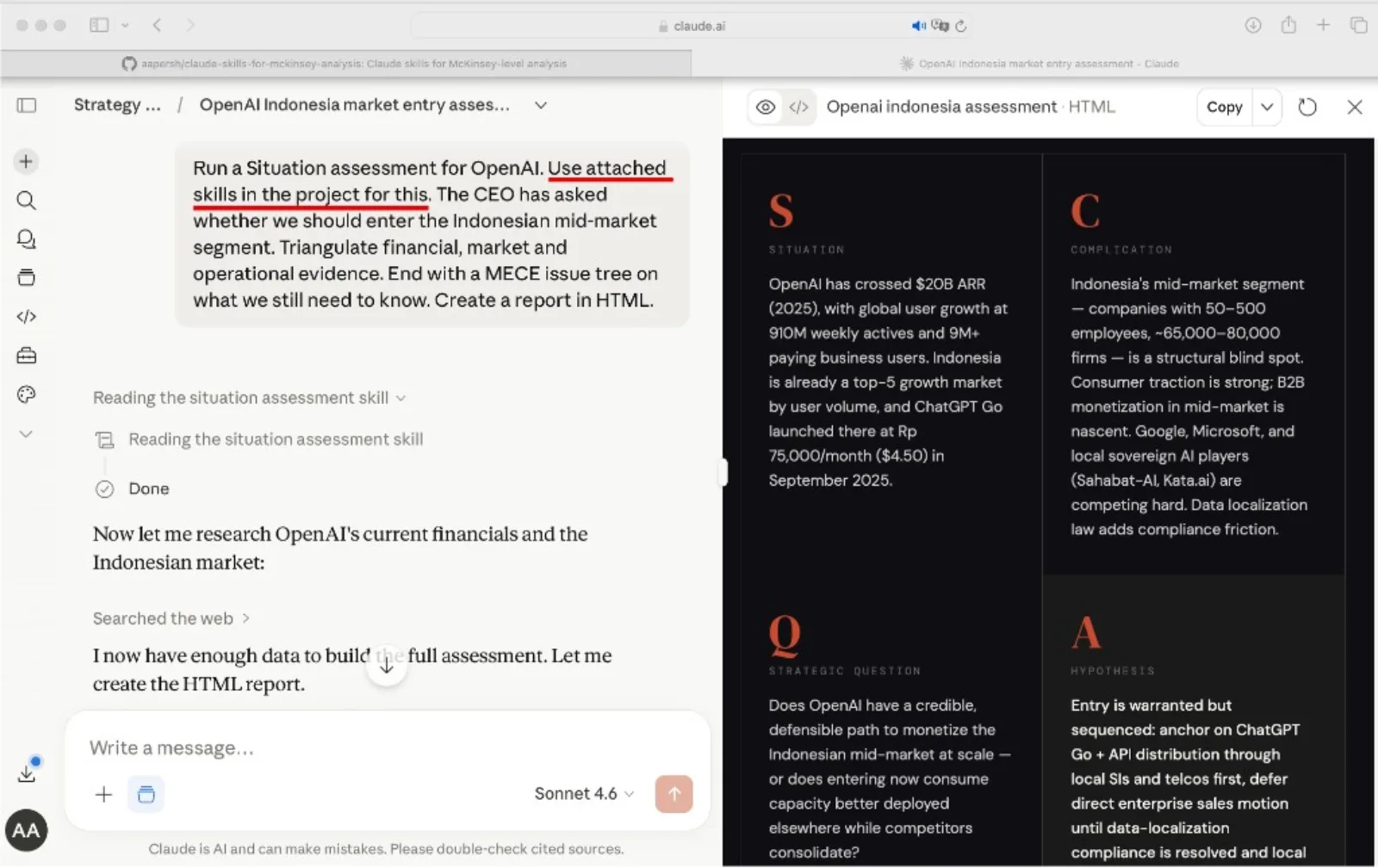
Name the skill in your prompt
Open a conversation, paste your notes or data, and name the skill for the task at hand. Claude reads the method and drafts the output with the framework already loaded, instead of guessing at a fresh approach each time.
Example prompts
- "Use the competitive-landscape-teardown skill on these three competitors, sources attached."
- "Use the meeting-notes-to-action-items skill on today's call notes."
- "Use the decision-memo-writer skill to turn this recommendation into a votable ask."
Final verdict
Start with a skill. It is the cheapest, the fastest, and the easiest to hand to a teammate, and it covers the large majority of recurring consulting and analyst work. Move to a subagent only when a job is genuinely long and tool-heavy enough to flood your main conversation. Reach for MCP when Claude needs a live line into a system you run, not before. Bundle into a plugin once a team is sharing more than one or two of these pieces, and use Projects for shared background rather than shared procedure.
Frequently asked questions
What is the difference between a Claude skill and a Claude subagent?
A skill is a method Claude reads and follows inside the conversation you are already having, no extra process. A subagent is a specialist with its own context window and its own tool access that Claude delegates a piece of work to and gets a report back from. Reach for a subagent only when the job would otherwise fill your main conversation with search results, file reads, or long intermediate drafts.
Is MCP the same thing as a Claude plugin?
No. MCP, the Model Context Protocol, is the open protocol that connects Claude to a live external system, a database, a ticketing tool, a CRM, through a running server. A plugin is a packaging format: it can bundle an MCP connection together with skills, subagents, and slash commands into one install. MCP is a connection type. A plugin is a delivery mechanism.
Can I use Claude skills without Claude Code?
Yes. Skills work as project knowledge in Claude Projects and as native skills inside Claude Code. Upload the SKILL.md files to a project, and Claude reads them as a method to follow, the same instructions, a different surface.
Do I need a subagent, or can a skill do it?
Start with a skill. Escalate to a subagent only when the task is genuinely long or tool-heavy enough that running it inline would flood your main conversation, deep research across many sources, or a multi-step audit with dozens of intermediate checks. Most recurring consulting and analyst tasks never reach that bar.
What is the difference between a Claude Project and a skill?
A Project groups conversations around shared background material: a style guide, past deliverables, reference documents. A skill is a procedure, numbered steps Claude follows to produce a specific output. Put reference material in a Project. Put repeatable methods in a skill. Most serious setups use both together.
How many Claude skills should a team start with?
Enough to cover the tasks that recur weekly, and no more. A focused pack of five or six real, frequently used methods beats a library of twenty skills nobody remembers to invoke. Start with the pack on this page, then add a skill only once a task has repeated three or four times.