

Macabacus Review: The Banker's Add-in and Where AI Fits
Macabacus is a Microsoft Office add-in suite for investment banking, private equity, FP&A, and consulting teams. It speeds up Excel modeling with shortcuts and model checks, links Excel outputs into PowerPoint and Word, and enforces brand compliance. It keeps models and documents consistent; it does not design new slides.
Macabacus review: quick answer
If you are weighing Macabacus, the decision is rarely add-in versus no add-in. It is which part of the model-to-deck chain is eating your hours: the Excel model, the numbers that must stay in sync with it, or the slide that carries them.
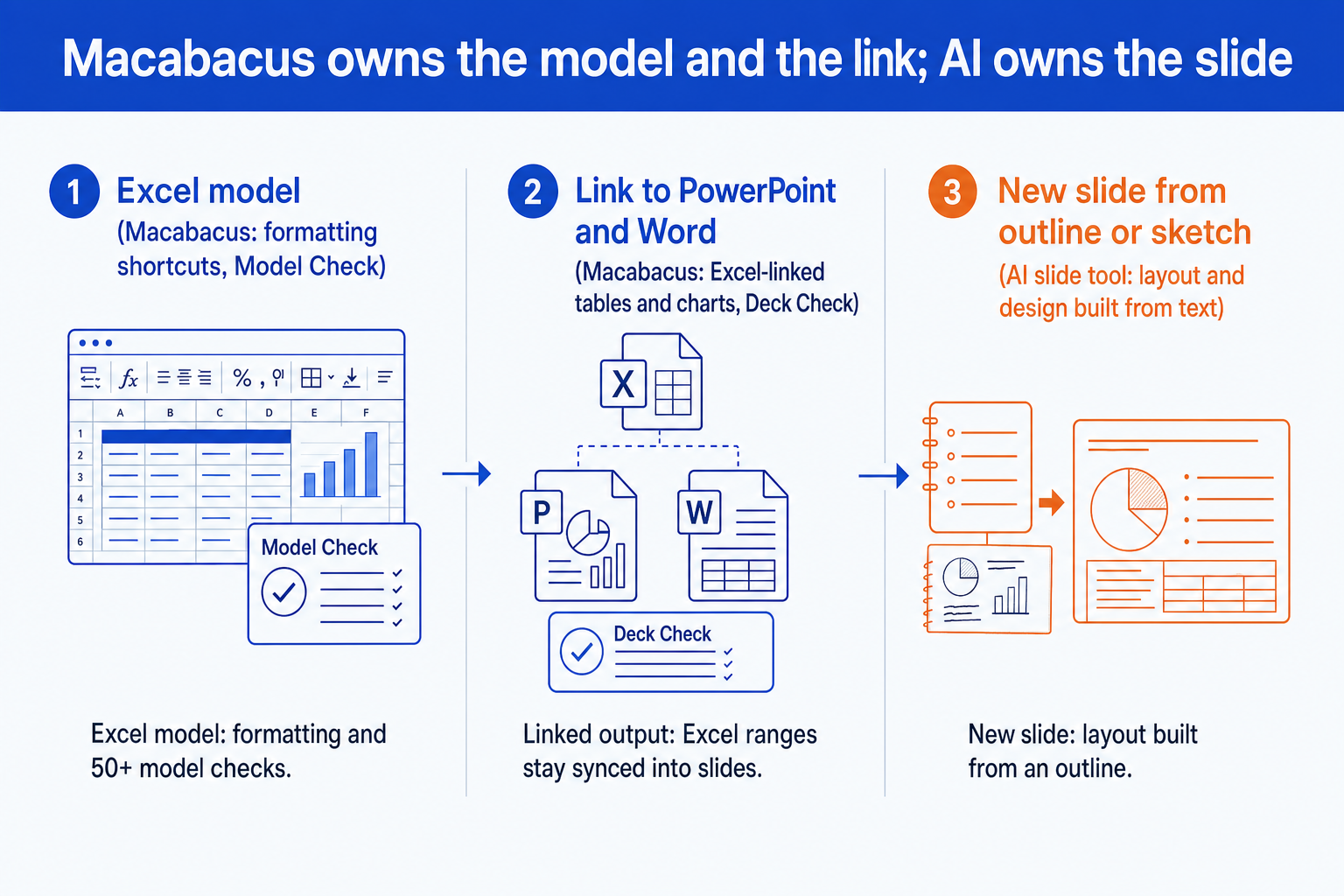
Macabacus is a suite of Excel, PowerPoint, and Word add-ins for banking, private equity, FP&A, and consulting teams. It formats and audits financial models, links Excel ranges and charts into decks and documents so they refresh, and checks decks for inconsistencies. It does not design a slide from an outline. That job belongs to an AI slide tool, and the two sit side by side: Macabacus for the model and the linked numbers, an AI tool for the layout built around them.
How we assessed Macabacus
Published vendor facts, checked against the vendor's own pages
Prices, module lists, and feature names come from the Macabacus pricing and product pages as they read when this was written. Vendor plans change, so confirm them before you buy.
The job each module does in a real deal workflow
We scored Excel, PowerPoint, and Word separately, because a banker's need for the Excel half says little about the slide half.
What a model-to-deck workflow still needs by hand
We looked for the steps that stay manual after the add-in is installed: laying out a slide, choosing the exhibit, drafting the headline.
Honest routing to other tools
Where a rival fits the job better, we say so and name it.
What we ignored: reseller "hours saved" calculators, unsourced adoption claims, and any feature we could not find on the vendor's own pages.
Key takeaways
- Macabacus is a productivity and brand-compliance suite for Excel, PowerPoint, and Word. Its centre of gravity is the financial model and the link from that model to the documents built on it, not slide design itself.
- The price steps up with the job. The Basic tier covers Excel shortcuts and formula auditing, while Excel-to-PowerPoint and Excel-to-Word linking sit in Professional. Check which tier owns the feature you are buying it for.
- Its checking tools reduce errors but do not certify a deck. Model Check and Deck Check flag patterns, and a flagged-nothing result is not the same as a correct model or a correct slide.
- Macabacus does not decide what a slide should look like. It keeps numbers synced and formatting consistent inside a layout someone already designed, which is the gap an AI slide tool targets.
- Treat the two as a pair rather than a choice. Keep the add-in for the model and the linked numbers, and route the slide-building step to a tool built for layout.
What Macabacus does, part by part
The product is sold as a suite, but it is several jobs under one license. The vendor says its user base is 75,000 users across 3,000 organizations, with a 4.7 star G2 rating. Score each module on its own before deciding what you need.
| Part of the suite | What it does | The limit to keep in mind |
|---|---|---|
| Excel: formatting and shortcuts | Keyboard shortcuts, number and colour formatting, and tracing tools for building and reading a model quickly. | Speeds a model analyst who already knows the layout. It does not design the model structure for you. |
| Excel: Model Check | Runs 50+ checks to find formula risks, hidden errors, and inconsistencies, per the vendor's product page. | A clean report means the checks found nothing, not that the assumptions are right. |
| Excel to PowerPoint and Word linking | Links ranges and charts from a workbook into a deck or a document so the numbers refresh from the source. | Keeps numbers current. It does not choose the exhibit or write the headline above it. |
| PowerPoint: Deck Check | Automated checks for errors, typos, and inconsistencies in a deck. A related Deck Check AIR flags table contradictions, miscalculations, and data mismatches. | Catches inconsistency inside a deck. It cannot tell you the slide argues the wrong point. |
| PowerPoint: libraries, logos, and brand tools | Shared libraries of branded slides and a logo library the vendor puts at 50M+ logos, plus shape and colour tools. | Helps a team stay on brand. Library slides still have to be assembled and filled by a person. |
| Word and the AI Writing Assistant | Document building, Excel linking, and an AI Writing Assistant the vendor describes as enforcing a company's voice. The pricing page lists it under Enterprise. | Applies to prose and documents. It does not generate designed slides. |
What does Macabacus do in Excel?
The Excel module is the heart of the product. It bundles formatting shortcuts, colour and number-format tools, and tracing aids that let an analyst move through a model without the mouse. Model Check adds a layer on top: the vendor describes it as running 50+ checks to pinpoint formula risks, hidden errors, and inconsistencies.
A testimonial on the Macabacus homepage gives the flavour of the value: "I have probably cut down on my model formatting time by 50%, and my models look better." That is a user's own estimate, published by the vendor, so read it as a description of where the time goes rather than a benchmark. If you build models in volume, the same ground is covered from the AI side in our guide to Claude skills for Excel modeling.
The trade-off: the add-in makes a good modeler faster and a messy model tidier. It does not fix a structurally wrong model, and its checks look for patterns rather than for whether your revenue build makes commercial sense.
How does Macabacus link Excel to PowerPoint and Word?
Linking is the feature that justifies the Professional tier for most banking teams. You point a slide or a document at a range or chart in a workbook, and the output refreshes when the source changes, instead of going stale after a paste. Deck Check then runs over the finished file to flag typos and inconsistencies, and Deck Check AIR looks for table contradictions, miscalculations, and data mismatches.
The trade-off: a link keeps a number current, but the slide around the number still has to be designed. A linked table in a poorly chosen layout is a correct number on a weak slide. For the exhibit that most often needs that care, see how to build a football field valuation slide.
How much does Macabacus cost?
The vendor's pricing page lists three tiers. Basic is 200 US dollars per license per year and covers Excel shortcuts, formula auditing, and colour palettes. Professional is 360 US dollars per license per year and adds Excel-to-PowerPoint and Word linking, advanced modeling and charting tools, and shared libraries. Enterprise is custom priced and adds the AI Writing Assistant, Deck Check AIR, single sign-on, and a dedicated account manager. A 14-day free trial needs no credit card.
The trade-off: the cheapest tier does not include the feature most buyers want it for. If linking is the reason you are evaluating the suite, you are pricing Professional, not Basic, and the AI features are an Enterprise conversation.
Worked example: a comps refresh, from model to slide
The figures below are illustrative, not market data. A trading comps table has three companies. Enterprise value (EV) is in millions and EBITDA is in millions. The multiple is EV divided by EBITDA. Prices refresh overnight and Company A's EV rises from 4,200 to 4,620.
Company A
Before: 4,200 / 525 = 8.0x
After: 4,620 / 525 = 8.8x
Company B
Before: 5,100 / 600 = 8.5x
After: 5,100 / 600 = 8.5x
Company C
Before: 2,800 / 400 = 7.0x
After: 2,800 / 400 = 7.0x
Before the refresh the multiples are 8.0x, 8.5x, and 7.0x, so the median is 8.0x. After it they are 8.8x, 8.5x, and 7.0x, so the median is 8.5x. Two things on the slide must change: the linked table row, and the headline that says the peer median is 8.0x.
With Macabacus linking: the table refreshes from the workbook, so the 8.8x appears without a re-paste. Deck Check may then flag inconsistencies between the figures on the slide, and a stale number is the error that reaches a client most often.
Without a link: someone re-pastes the range and has to remember the headline. The risk is a table that says 8.5x under a title that still says 8.0x.
What neither does: decide that the slide should be a football field instead of a table, or lay it out. That step is the slide, and it is where an AI slide tool takes over.
When Macabacus is the right call
The team builds and audits financial models every week and wants consistent formatting and fewer hidden formula errors.
Decks and documents carry numbers from a workbook that changes, such as comps, precedent tables, and returns analyses, and a stale paste is the risk you are managing.
A firm-wide brand standard has to hold across Excel, PowerPoint, and Word, and a shared library is the way to enforce it.
The work is mostly numbers and documents, and the slides are simple tables and charts rather than bespoke layouts.
When Macabacus misleads
The risk is false comfort. A model that passes its checks reads as reviewed, and a deck with no flags reads as clean. Both are statements about patterns, not about judgement. A circular reference or a hardcoded plug is easy for a check to find. A growth rate that no buyer would believe is not.
A second trap is the live link. A linked table is only as right as the range it points at, and if someone inserts a row in the source, the slide can refresh to the wrong cells and still look tidy. Check the first refresh against the model by eye. A third is scope: buyers evaluating the suite for "AI slides" find that the documented AI features are a writing assistant and a deck checker, not a slide generator.
Where does AI fit next to Macabacus?
AI slide tools address the step Macabacus leaves open: turning an outline, a note, or a whiteboard photo into a laid-out slide. Oria is one, and it reaches you two ways: a PowerPoint add-in in the task pane, and a connector for Claude and ChatGPT over MCP, so the slide can be built from a chat without opening PowerPoint. The output is native, editable PowerPoint on your corporate template. Setup for the chat route is in installing Oria in Claude and ChatGPT.
| Question | Macabacus | AI slide tool (Oria) |
|---|---|---|
| Core job | Keep Excel models, linked numbers, and brand formatting consistent across Excel, PowerPoint, and Word. | Build the slide itself, layout and design included, from an outline, notes, or a sketch. |
| Where it runs | Add-in inside Microsoft Excel, PowerPoint, and Word. | A PowerPoint add-in in the task pane, and a connector for Claude and ChatGPT over MCP. |
| What it needs from you | A finished model and a slide layout you built or pulled from a library. | A text outline, a note, or a photo of a sketch. The model stays in Excel. |
| Strongest on | Model hygiene, linked tables, deck consistency checks. | Dense consulting-style slides on an enforced corporate template. |
| Weakest on | Designing a new layout. It works inside the layout you give it. | Highly visual work such as fundraising or launch decks, and it does not build the financial model. |
Oria is built for the corporate environment only, so it loses on highly visual work such as fundraising and launch decks, where a design-led tool beats it. It also does not build or audit the financial model. For the wider field of tools scored for consultants, see the tested list of PowerPoint add-ins and our think-cell cost and AI review.
The trade-off: adding an AI slide tool adds a second tool and a second bill. The gain is only real if layout is the step costing you hours.
How to set up a model-to-deck workflow
- Run the model checks and fix what they flag, then review the assumptions by hand.
- Link the output ranges to the deck so the numbers refresh from the workbook.
- Describe the slide you need in a short prompt, or drop in a sketch, and let the slide tool build the layout on your template.
- Run the deck-level consistency check, then compare the headline numbers with the model once, by eye.
For a banker, the chain from model to exhibit is the same each time. See investment banking agents for Claude for the AI side of the workflow.
If you need X, use Y
| If you need | Use | Why |
|---|---|---|
| Excel model formatting, tracing, and error checks for a banking team | Macabacus | This is what the suite is built around, and it is the more mature answer for the Excel side. |
| Numbers in a deck that must refresh from the model | Macabacus linking | Linking a range from the workbook is the safer way to keep a comps table current. |
| Chart automation: waterfalls, stacked bars, Gantt | think-cell | A dedicated chart tool edits an existing chart faster. See our think-cell review for the costs. |
| A dense slide built from an outline, a note, or a whiteboard photo, on your template | Oria | It builds native, editable PowerPoint on your master, inside PowerPoint or from a Claude or ChatGPT chat. |
| A visual pitch, launch, or fundraising deck | Gamma, Canva, Pitch, or Beautiful.ai | Oria is built for the corporate environment only, so a design-led tool wins on visual impact. |
| Light tidy-up with no add-in budget | Built-in PowerPoint tools | Free and already open. They simply do far less. |
Frequently asked questions
What is Macabacus used for?
Macabacus is a suite of Microsoft Excel, PowerPoint, and Word add-ins used mainly by investment banking, private equity, FP&A, and consulting teams. It speeds up financial modeling with formatting shortcuts and error checks, links Excel ranges and charts into decks and documents so they refresh, and enforces brand consistency.
How much does Macabacus cost?
Its pricing page lists Basic at 200 US dollars per license per year, Professional at 360 US dollars per license per year, and custom pricing for Enterprise. A 14-day free trial is offered with no credit card required. Confirm current figures on the vendor's page before budgeting.
Is there a Macabacus free trial?
Yes. The vendor's pricing page states a 14-day free trial with no credit card required. It is the right way to test the Excel and linking tools against your own models before committing a team budget.
Does Macabacus have AI features?
The vendor lists an AI Writing Assistant for Word and PowerPoint text, and Deck Check AIR for detecting table contradictions, miscalculations, and data mismatches in a deck. Its pricing page places both under the Enterprise plan. Neither is described as generating a designed slide from an outline.
What is the best Macabacus alternative?
It depends on which half you want to replace. For chart automation inside PowerPoint, think-cell is the usual comparison. For building the slide itself from text or a sketch, an AI slide tool such as Oria covers different ground. None of them is a like-for-like substitute for the Excel model tooling.
Is Macabacus worth it for investment banking?
For a team that builds and audits models weekly and refreshes linked comps and precedent tables, yes: the linking and the model checks remove repetitive, error-prone work. For a team whose bottleneck is building the slide itself, it addresses a different problem, and the add-in will not design the layout.
Can Macabacus build slides with AI?
Not in the sense of generating a designed slide from an outline. Its AI features are documented as a writing assistant and a deck-checking tool. Generating a full, editable slide from text or a sketch is the job of a slide-generation tool.