

think-cell in 2026: What It Costs and What AI Changes
think-cell is a PowerPoint add-in that automates the charts, agenda slides, and linked Excel tables consultants and bankers build most: waterfalls, stacked bars, Gantt timelines, and tables that update when the source workbook changes. It runs inside native PowerPoint on a per-seat annual license, not a one-time purchase.
Quick answer: what does think-cell cost, and can AI replace it?
You already know what think-cell is if you are asking this. The real question is whether the license is still worth renewing now that AI tools generate whole slides, not just charts, from a prompt.
think-cell Suite runs roughly 28 to 31 US dollars per seat per month billed annually, dropping toward 22 dollars once a team passes fifty seats, and that price bundles Charts, Core, Library, and the Agenda tool together. AI does not make think-cell obsolete in 2026. It narrows the reason to buy it. A visual-rendering tool such as Oria now generates the full slide, layout included, from a prompt or a sketch, a job think-cell never attempted. What think-cell still owns outright is fast, precise chart editing inside a deck someone is already building by hand, which remains a real and separate job.
How we priced this out
The seat price itself, not a marketing figure
We priced this against real purchase data rather than the promotional number shown at checkout, and against the volume tiers a growing team actually moves through.
What a license actually bundles
Charts, Core, Library, and the Agenda tool ship together as one Suite license. We checked what is included versus what is sold separately, because that is where a quote gets padded.
Where AI removes the need to buy, versus adds a second bill
Some of think-cell's job is now redundant against a slide-generation tool. Some of it is not. We scored each part of the license separately instead of treating think-cell as one thing.
The switching cost, not just the sticker price
A tool nobody has to relearn is worth more than its list price implies. We weighed how long a new analyst takes to get productive against each option.
What we ignored: vendor uptime claims, unverified "hours saved per year" calculators published by resellers, and any pricing figure that only appeared after a "contact sales" form.
Key takeaways
- think-cell is chart-and-table automation, not a slide generator. It builds the exhibit inside a slide you are already laying out by hand. It does not decide the layout, the narrative, or the elements around the chart, which is the job an AI slide tool now does instead.
- The license gets cheaper per seat as the team grows, not as usage grows. A five-person team pays close to the same per-seat rate whether analysts build two charts a week or twenty, so the economics favor teams that live in PowerPoint charts daily.
- AI changes the target, not think-cell's competence at its own job. think-cell still builds a cleaner waterfall or Gantt chart faster than doing it by hand in native PowerPoint. The AI shift matters most for the slides think-cell never touched at all.
- The Agenda tool and the live Excel-linked tables are why teams keep renewing after the novelty of the chart tool wears off. A table that updates without a copy-paste is a daily habit, not a feature most buyers evaluate up front.
- Keep think-cell for the exhibit pack if the team already owns it and is chart-heavy. Route the rest of the deck, the slide built from a rough outline or a sketch, to a tool built for that different job.
The think-cell toolkit, part by part
"think-cell" is sold as one Suite license, but it is really five separate jobs bundled together. Score each one on its own before deciding whether AI changes anything about it.
| Part of the license | What it does | Where AI changes the calculus |
|---|---|---|
| think-cell Charts | Builds waterfalls, stacked and mekko bars, and combination charts inside PowerPoint, reading its data straight from a linked Excel range. | A slide-generation tool can produce the same chart from a one-line prompt, but think-cell still edits faster once the chart already exists on a slide. |
| think-cell Agenda | Keeps a running table of contents and section-divider slides in sync automatically as slides move, get added, or get deleted. | Untouched by AI slide tools so far. Nothing reviewed here replaces this specific bookkeeping job. |
| think-cell tables (Excel-linked) | Pastes a PowerPoint table that updates when the source workbook changes, instead of a static paste that quietly goes stale. | AI tools that generate a whole slide from text do not read a live Excel range the way a linked think-cell table does. |
| think-cell GANTT and timeline tools | Draws project timelines and Gantt bars with automatic date math from a linked schedule. | A prompt-driven tool drafts a timeline slide from a rough plan faster, but without the live date recalculation underneath it. |
| Licensing and pricing | A per-seat annual subscription, cheaper per head as the team grows, with no perpetual or one-time purchase option. | AI slide tools price by generation volume or seat, not by which chart types get used, so the two bills answer different questions. |
What does the think-cell chart tool actually do?
You select a data range in a linked Excel workbook, insert a chart type from the think-cell ribbon, and the add-in draws it directly in PowerPoint: a waterfall with floating segments and automatic value or percentage labels, a stacked or mekko bar with segment totals that recompute when a number changes, or a combination chart mixing bars and a line. Resizing, restyling to your brand colors, and moving the chart to a new slide layout stay one-click operations instead of a manual rebuild.
Adrián Fernández Gil, Global Product Manager at Almirall, put the speed gain plainly in think-cell's own published customer testimonials: "With thinkcell, I'm able to work almost three times faster compared to using standard PowerPoint features." That estimate lines up with how the tool actually saves time: not by deciding what to chart, but by removing the manual labeling and alignment work once the decision is made.
The trade-off: think-cell is quick because it only ever works inside a chart that already exists. It will not decide that a bar chart is the wrong exhibit for this argument, or that the chart belongs on a different slide layout entirely. That judgment call stays with whoever is building the deck, or increasingly, with an AI tool asked to build the whole slide instead of just the chart on it.
What do the Agenda, table, and GANTT tools add?
Agenda maintains a deck's running table of contents and its section-divider slides automatically, renumbering and re-sequencing them every time a slide moves, gets added, or gets cut, which matters most on a fifty-plus-slide deck edited by three people the night before a review. think-cell's table tool pastes a PowerPoint table that stays linked to its source Excel range, so a model update flows through without a re-paste. The GANTT and timeline tool does the same for project schedules: dates and bar lengths recalculate from the linked plan instead of being redrawn by hand.
The trade-off: these three tools are why long-time users renew even after the novelty of the chart tool wears off. They fix small, recurring annoyances rather than one big one, so their value is easy to underrate in a renewal conversation and easy to miss once you go a week without them.
What does a think-cell license actually cost in 2026?
Vendr, which benchmarks real SaaS purchase data rather than list prices, puts think-cell Suite at 370.80 US dollars a year for a single seat under five licenses. The per-seat rate steps down as a team grows: 27.40 US dollars a month at five seats, 25.80 at ten, 23.80 at twenty-five, and 22.00 at fifty, all billed annually. The subscription bundles Charts, Core, and Library, and includes updates, training materials, and technical support for the term of the license.
Scale is the context that number needs. think-cell's own customer page states that more than 35,000 companies and 1.3 million individual users rely on the product across 180-plus countries, and on G2 it holds a 4.5-star rating across 82 verified reviews. That is a mature, entrenched tool with a genuine enterprise footprint, not a niche add-in a procurement team is likely to question line by line.
The trade-off: the per-seat price looks small next to a consulting or banking salary, which is exactly why procurement rarely fights it, and exactly why nobody revisits whether every licensed seat still opens the chart tool weekly. A tool that is easy to keep paying for is not the same as a tool that is still earning its renewal.
Building a revenue bridge: think-cell vs. PowerPoint vs. AI, worked
Same six numbers, three build paths. Q1 revenue is 42.0m. A price effect adds 3.1m and a volume effect adds 5.4m. FX subtracts 1.8m and churn subtracts 2.2m. Tied out: 42.0 plus 3.1 plus 5.4 minus 1.8 minus 2.2 equals 46.5m, which is Q2 revenue. Every build below has to land on that same 46.5m or the chart is wrong, no matter how it looks.
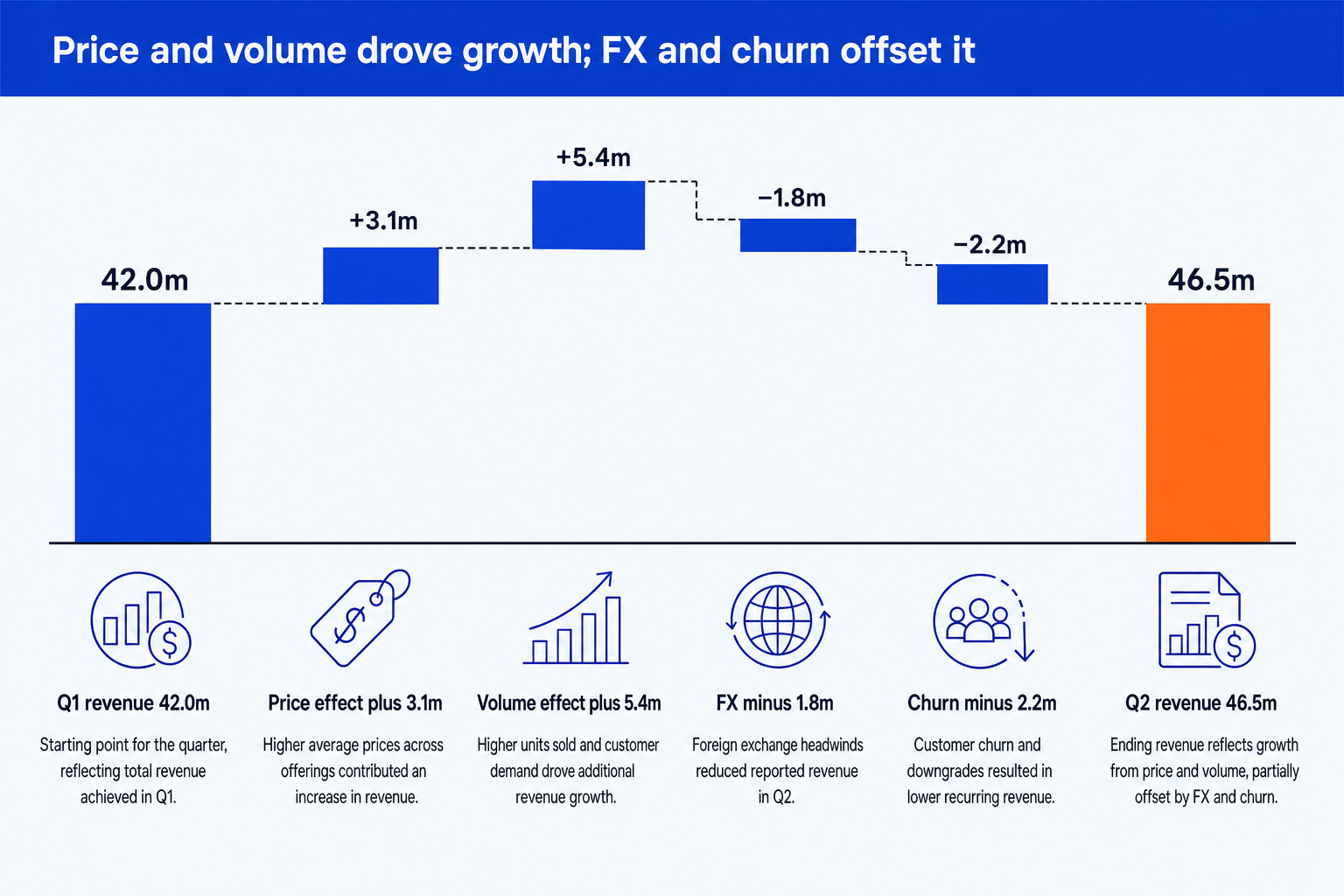
By hand in native PowerPoint, about 25 to 35 minutes. Build invisible base bars to fake the floating effect, compute each segment's cumulative offset by hand, add six data labels one at a time, then restyle every bar to the brand palette.
With think-cell, about 3 to 5 minutes. Paste the six line items into the linked Excel range, insert the waterfall chart type, and think-cell computes the floating segments, the running total, and the value labels automatically. Restyling to brand colors is a one-click step.
With an AI slide tool such as Oria, about 2 to 3 minutes. State the six line items in one prompt and get two to five design options for the full slide, headline and takeaway included, not just the chart. Pick a direction and refine it in the same chat.
think-cell beats the manual build by roughly six to eight times on this chart alone. The AI route matches think-cell on chart speed and adds the slide built around it, which is the part think-cell was never asked to do. For the manual steps in full, see our guide to building a waterfall chart slide, and for the related exhibit that tells a similar story with cost synergies instead of revenue, see how to build a synergy bridge slide.
When think-cell is the right call
The team already owns the license and builds waterfall, bar, or Gantt charts every week, so the shortcuts are muscle memory rather than a new tool to learn.
The chart lives inside a slide someone is already laying out by hand in native PowerPoint, and the job is only to make that one chart faster and cleaner.
The deck runs long enough that the Agenda tool's automatic section numbering earns back its own cost in avoided renumbering before a client meeting.
The data cannot leave the device. think-cell's charts and tables compute locally inside the file already open on the analyst's machine, with no prompt or slide content sent to a server, which matters on a deal still under an NDA.
Where think-cell runs out, and what AI actually changes
think-cell only ever automates what you already decided belongs on the slide. It has no opinion on layout, no opinion on which framework fits the argument, and no reach into a bespoke, multi-element slide such as a 2x2 positioning matrix, an org chart, or an executive summary with KPI tiles and narrative text. Those still get built by hand in native PowerPoint, chart tool or not.
That gap is what AI slide tools target, and they take one of three technical approaches. Pre-selected-template tools force your content into a small library of fixed layouts, which loses detail fast on a dense slide. HTML-based agents, the approach behind Microsoft Copilot for PowerPoint and Claude's own PowerPoint plugin, draft the slide as a web page first and convert it to PPTX, which tends to run slow and lands broken margins or type sizes on a complex layout. A third, newer approach renders the slide as an image first and then decomposes that render into native, editable PowerPoint elements. Oria is currently the production example of that third approach: it reaches you as a PowerPoint add-in and, separately, as a connector inside Claude and ChatGPT over MCP, so the slide can be built from a chat without opening PowerPoint at all.
None of that makes an AI slide tool the right pick for every job think-cell adjoins. Oria is built for the corporate environment specifically, and it loses on highly visual work: founder fundraising decks, launch and campaign decks, student presentations, and marketing one-pagers all want visual impact more than defensible content, and a design-led tool will beat it and look better doing so. For the wider field of AI presentation tools scored against a consulting audience, including where think-cell itself fits alongside them, see our guide to the best AI presentation tool for strategy consultants.
The trade-off: an AI slide tool answers a bigger question than think-cell ever tried to. That also means it is doing more work per slide, and more moving pieces is more places for a brand or corporate-template detail to slip, which is a failure mode a strict, single-purpose chart tool simply does not have.
If you need X, use Y
The tool question and the cost question are the same question, once you name what the job actually is. See our cost and speed comparison against a design agency for how the AI side of this table stacks up against the option think-cell never competed with either.
| If you need | Use | Why |
|---|---|---|
| Fast, precise chart automation inside a deck you already build by hand | think-cell | Nothing beats it for waterfalls, stacked bars, and Gantt charts once the license is sunk and the team knows the shortcuts. |
| A full slide, layout and all, built from a rough outline, notes, or a sketch, on your corporate template | Oria | Runs as a PowerPoint add-in and as a connector inside Claude and ChatGPT over MCP, and outputs native, editable PowerPoint on your master rather than an image or fragile HTML. |
| A fast, attractive deck or web page for a pitch, a launch, or a marketing story | Gamma, Canva, Pitch, or Beautiful.ai | Where the job is visual impact rather than defensible content, a design-led tool beats a corporate-template tool and looks better doing it. |
| In-cell Excel formatting and model-linking for a banking pitch book | Macabacus | It owns the Excel and Word side of the workflow that think-cell and slide-generation tools do not touch. |
| Light chart tidy-up with no add-in budget at all | PowerPoint Designer, built in | No cost, no license, and it is already open. It just does far less than a dedicated chart tool. |
| To decide whether the whole license is still worth renewing | Your own usage logs from the last 90 days | The license cost is fixed. The number of analysts who actually opened the chart tool this quarter is not, and it is the only number that answers the question. |
Frequently asked questions
What is think-cell used for?
think-cell is a PowerPoint and Excel add-in that automates the charts, agenda pages, and tables consultants and bankers build most: waterfall and stacked bar charts, GANTT and timeline charts, running section dividers, and PowerPoint tables that stay linked to a source Excel workbook instead of going stale after a copy-paste.
How much does think-cell cost in 2026?
Vendr's benchmark of real purchase data puts think-cell Suite at 370.80 US dollars a year for a single seat under five licenses. The per-seat rate steps down as a team grows: 27.40 US dollars a month at five seats, 25.80 at ten, 23.80 at twenty-five, and 22.00 at fifty, all billed annually and bundling Charts, Core, and Library together.
Is there a free think-cell alternative?
Native PowerPoint chart tools and Designer are free and already installed, but they do not automate the waterfall math, the linked Excel tables, or the running agenda the way think-cell does. think-cell itself is free for students, professors, and qualifying nonprofits through its academic program. Outside that, an AI slide tool covers different ground rather than the same one for free.
Does think-cell work on Mac or in Google Slides?
think-cell 10, released in May 2026, was the first version to bring full charting to macOS, running on Microsoft Office 2019, 2021, or 2024 for Mac on macOS Big Sur or later. It has never run inside Google Slides. Slides uses a different, web-based add-on architecture that think-cell was not built for, and the documented workaround is to build the chart in PowerPoint and paste it into Slides as a static image that breaks the moment the underlying data changes.
Can AI replace think-cell?
Not outright, but it narrows the reason to buy it. An AI slide tool generates the whole slide, layout included, from a prompt or a sketch, which think-cell never attempted. What think-cell still does better is fast, precise editing of a chart that already exists inside a deck someone is building by hand, which is a real, separate job the two tools do not actually compete on.
What is the think-cell Agenda tool?
Agenda is the think-cell module that manages a deck's running table of contents and section-divider slides. It updates the section list automatically as slides get added, removed, or reordered, so the agenda page and every divider stay in sync without anyone manually renumbering them before a client meeting.
Is think-cell still worth it in 2026?
For a team that builds waterfall, bar, or Gantt charts every week and already owns the license, yes: nothing else edits an existing PowerPoint chart as fast. For a team whose real cost center is building the whole slide from a rough outline, the question has shifted to whether an AI slide tool covers that job better, since that is not a job think-cell was ever built to do.