

Issue Tree: Examples, the MECE Framework, and How to Build One
Two decisions sit inside every issue tree, and only one of them is about drawing boxes. The first is how you split the question: get the top split wrong and every hour of analysis underneath it is spent on the wrong thing. The second is where the tree lives, which changes as the work moves from arguing about branches on a wall to putting one branch in front of a steering committee. This page covers both: three worked trees you can copy, the MECE test applied at every level, how a hypothesis tree differs, and six honest ways to build and present the diagram.
What is an issue tree, and how do you build one?
An issue tree is a diagram that breaks one business question into a small set of MECE branches and keeps splitting each branch until it names something testable. Build the first version on a whiteboard, where restructuring is free and nobody is precious about a box. Move it to a diagramming tool such as Miro, Lucidchart or the free draw.io once it has more than about a dozen live nodes. Put it on a slide only at the end, and only the branch that answers the question: PowerPoint SmartArt for three or four boxes, native shapes or an add-in such as Oria when it has to sit on an enforced corporate template.
What is the issue tree framework?
The issue tree framework is four parts and one habit, and the habit is the hard part: you diagnose before you solve. In a survey of 106 C-suite executives across 91 private and public-sector organisations in 17 countries, reported by Thomas Wedell-Wedellsborg in Harvard Business Review in January 2017, 85% agreed their organisations were bad at diagnosing problems, and 87% agreed the flaw carried real cost. His account of why is short: managers "switch quickly into solution mode without checking whether they really understand the problem". An issue tree is the cheapest brake on that reflex, and the first of the consulting frameworks most analysts learn.
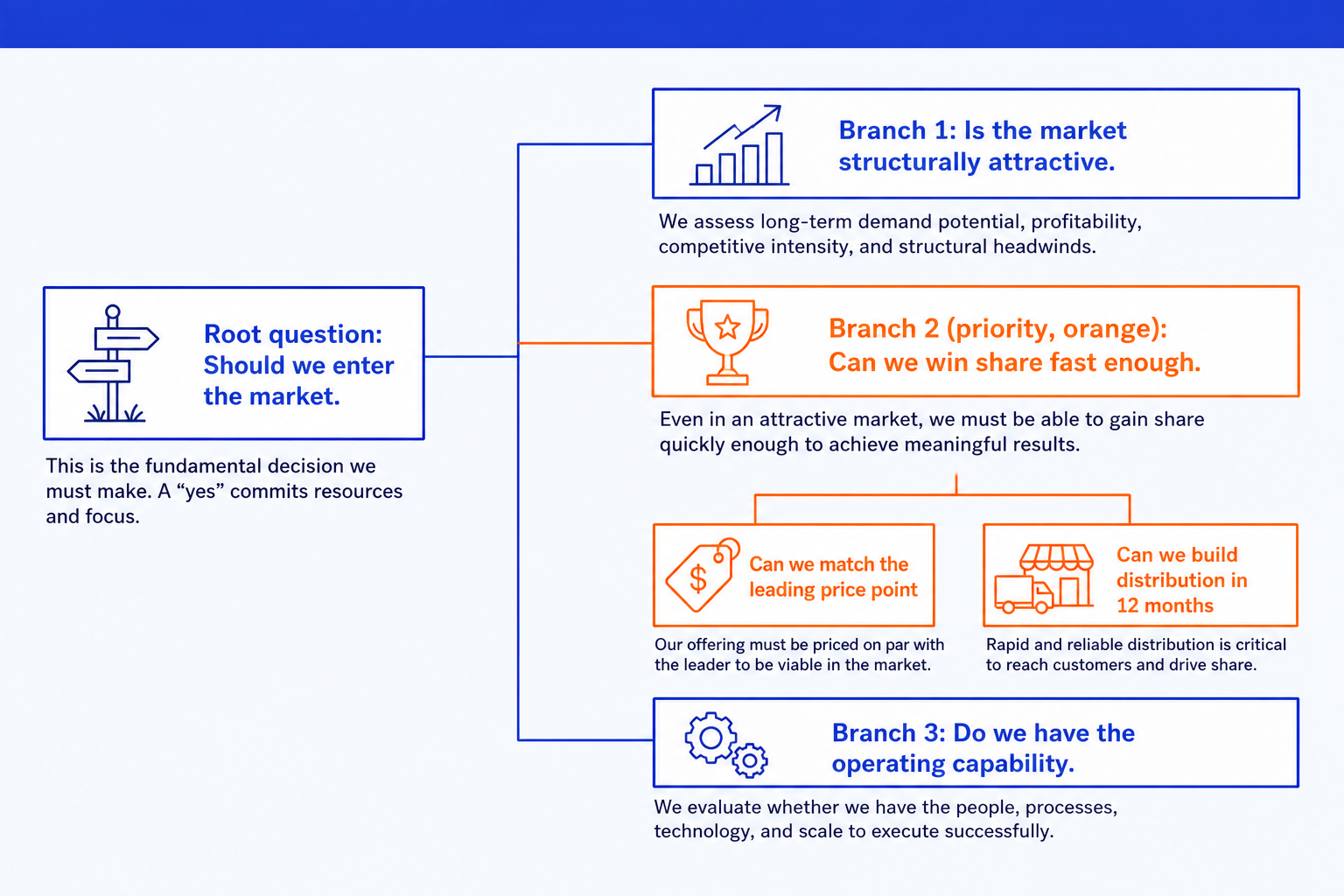
Root question. The question the tree exists to answer, written as a question, not a topic label.
First-level branches. Three or four MECE slices of the root question.
Sub-branches. Each branch splits again until a sub-issue names the analysis that would prove or disprove it.
Priority branch. The branch most likely to hold the answer and cheapest to test.
Three or four first-level branches is the convention, and there is a reason it holds. Nelson Cowan's 2001 review in Behavioral and Brain Sciences put the focus of attention at roughly four chunks in normal adults. Six branches is not more rigorous; it is a level nobody can hold in mind while arguing about the third one.
Building one, step by step
Write the root question as a real question
"Should we enter the market?" is a root question. "Market entry" is a topic, and gives the tree nothing to test.
Split on the logic, not on where the data lives
A profitability question splits into revenue and cost, not into "internal data" and "external data".
Run the MECE test at every level
Both checks below, applied to every set of siblings.
Push each branch down until it is testable
Stop the moment a branch names something you could go and prove this week.
Prioritise, then prune
Rank the first-level branches by impact and speed to test, then park all but one.
What makes an issue tree MECE?
MECE is two checks, and the discipline is applying both to every set of sibling branches rather than once at the top. Mutually exclusive: could any single fact be filed under two of these branches? If yes, the split is wrong, not the fact. Collectively exhaustive: can you name a relevant case that fits under none of them? If yes, a branch is missing.
There are two grades of MECE. Splits derived from an identity are MECE by construction: profit equals revenue minus cost, so a revenue and cost split cannot overlap or leave a gap. Every other split is MECE by argument, and somebody senior can and will challenge it.
For the test itself and the standard ways a split fails, see our guide to the MECE principle.
Issue tree examples: three worked trees
Three questions that come up constantly, broken down properly and MECE-tested. The MECE test line on each is the sentence that has to survive a partner review.
Market entry issue tree
The market entry issue tree splits on the three conditions that all have to hold. Note what is not a first-level branch: entry mode is a sub-issue of whether you can win.
Root question
Should we enter the German commercial cleaning market within 18 months?
1. Is the market worth entering at all?
- How big is the addressable spend, and is it growing or shrinking?
- How much profit sits in it after cost to serve, not just revenue?
- Is anything structural about to change it: regulation, labour cost, insourcing?
2. Could we win a defensible position in it?
- Does our cost position survive the likely response from incumbents?
- Can we reach the buyers, or is the channel locked up by framework contracts?
- What do we have that a local operator would need two years to copy?
3. Is entry the best use of this capital and this management time?
- What is the next best use of the same money, and what does it return?
- How long until the position is cash positive?
- What does being wrong cost, and can we exit without a write-down?
MECE test. Every fact lands in exactly one branch. A competitor's cost base is evidence about branch two, not branch one, even though it is a fact about the market. If two people file the same fact in two places, the split is wrong.
Test this branch first. Branch two. It is most likely to kill the decision and cheapest to test: four customer conversations and a cost teardown answer it in a week.
Branch one is where the sizing work sits: our guide to the market sizing slide covers how it becomes a number a client will accept.
Profitability decline issue tree
This is the example worth memorising, because its top split is the rare one you can prove rather than argue.
Root question
Why did operating profit fall 14% last year, and what do we do about it?
1. Is the fall on the revenue line?
- Volume: fewer customers, buying less often, or smaller baskets?
- Price: list price, discount depth, or promotional mix?
- Mix: a shift toward lower-margin products, channels or geographies?
2. Is the fall on the cost line?
- Variable cost per unit: input prices, yield, or rework?
- Fixed cost: headcount, footprint, or contracted services?
- One-offs: a write-down, a settlement, or a restructuring charge?
MECE test. Nothing can sit under both branches and nothing can fall outside them, because the split comes from the definition of operating profit. Every level below this one has to be argued on its merits.
Test this branch first. Neither, yet. Quantify the variance first: work out how many of the 14 points each of the six sub-branches explains, then go deeper only on the ones above about three points.
Pushed further, this tree becomes a value driver tree. Our guide to the value driver tree slide covers the version with numbers on every node.
Cost reduction issue tree
A cost question is where the department reflex does the most damage. Split by process step instead and the tree stays MECE.
Root question
Where can we take 15% out of cost to serve without moving service levels?
1. Cost to acquire the customer
- Paid acquisition per new account, by channel
- Sales time per closed account
- Onboarding and set-up work done before the first invoice
2. Cost to fulfil the order
- Unit cost of the work itself, in-house against contracted
- Rework and failed deliveries, and what causes them
- Capacity held for peaks that the peaks do not use
3. Cost to support the account after the sale
- Contacts per account per year, and which product causes them
- Cost per contact by channel
- Credits, goodwill and concessions
MECE test. Splitting by department would overlap, because two of them touch fulfilment, and leave a gap, because outsourced steps belong to no department. A process split has neither problem.
Test this branch first. Branch three. Support cost is usually the branch nobody owns, and its driver, contacts per account, is already in a system somebody can query this afternoon.
What is issue tree analysis?
Issue tree analysis is everything that happens after the diagram is drawn: deciding which branches earn a week of somebody's time, running the tests, and killing what does not survive. Four moves turn a picture into a work plan.
Quantify the variance before you go deeper. Work out how much of the gap each branch explains before analysing any of them. Branches worth a point or two get parked.
Score each branch on impact and on cost to test. The branch that would move the answer most and can be tested fastest is where the week goes.
Turn each live branch into one owner, one analysis, one date. A branch nobody owns gets discussed in every meeting and closed in none of them.
Prune out loud, and write down why. Killed branches are the most useful part of the tree in a review: the first thing anyone senior asks is what you ruled out.
Hypothesis tree vs issue tree: what is the difference?
They look almost identical on a whiteboard and do opposite jobs. Confusing them is why teams spend three weeks being exhaustive about a question they answered in week one.
What sits at the root. An issue tree has a question. A hypothesis tree has an assertion: "We should enter through a joint venture."
How the branches relate. Issue tree branches are alternatives, so one holds the answer. Hypothesis tree branches are conditions, so all must hold or the hypothesis falls.
When you build each one. The issue tree comes first, when nobody has a candidate answer. The hypothesis tree comes second, once one branch looks strongest.
How each one fails. An issue tree fails by boiling the ocean; a hypothesis tree fails by confirmation bias, because you are hunting evidence for a sentence you wrote.
The moment you can write the answer as a sentence, the issue tree has done its job. Our guide to hypothesis-driven problem solving covers the handover.
How we compared the ways to build one
Each route below was judged on what happens to the tree over a two-week piece of work, not on how good the first screenshot looks. Five criteria, applied identically:
- Time to a first tree somebody else could read, not to the moment the tool stops.
- Cost of restructuring: we inserted a branch at level two and counted what had to move.
- Whether the output is a native, editable slide or a picture. We opened every export and tried to move a box.
- Whether a corporate template survives. We built the same branch on a policed master and checked fonts and colours.
- Where it belongs, because no route wins thinking, maintaining and delivering at once.
Ignored on purpose: template galleries, because you already have a template; shape libraries, because an issue tree needs rectangles and elbow connectors; and any vendor time-saving claim we could not reproduce.
Key takeaways
- Time to a first tree is the least important thing here. Every route gets you a rough tree inside an hour. The hour worth protecting is the next one, when the top split turns out to be wrong and everything below it moves.
- Restructure cost decides the first two days. Early trees are mostly branch-moving. Pick the format where moving one is free.
- Native beats pretty as soon as the deck is policed. A picture of a tree cannot be edited by whoever inherits the file at 11pm. In a board pack, insist on native shapes.
- Template fidelity is where the AI routes actually differ. Output quality across the generators is broadly similar. How much of your corporate master survives the trip is not, and that is what to test.
- Match the tool to the stage, not to the brand. Thinking, maintaining and delivering are three jobs. Pick one tool for all three and you either format what you are about to delete, or ship a photo of a whiteboard.
Issue tree diagram: six ways to build and present one
The same five criteria, applied to every route. Rows are alphabetical, not ranked.
| Route | Time to a first tree | Cost of restructuring | Native, editable slide? | Does your template survive? | Where it belongs |
|---|---|---|---|---|---|
| A design-led generator (Gamma, Canva, Beautiful.ai) | Minutes, from a prompt | You regenerate rather than edit | No: a generated layout, exported | It brings its own design system | Visual-first decks, where the picture is the deliverable |
| A diagramming tool (Miro, Lucidchart, draw.io) | Minutes, and it can stay rough | Free: auto-layout re-flows the diagram | No: PowerPoint gets an image | Not relevant: the file never joins the deck | The working tree, all engagement long |
| Native PowerPoint shapes, by hand | An hour, and the same hour every time | Expensive: you re-space by eye | Yes, by definition | Perfect: nothing but PowerPoint touches it | The final slide, when it must be exact |
| Oria (PowerPoint add-in, or Claude and ChatGPT connector) | Seconds to layout options from one line | Cheap: re-describe the branch, it re-renders | Yes: native shapes and text, not a picture | Yes: upload the template once, held after | The delivery slide, on an enforced corporate template |
| PowerPoint SmartArt | Under ten minutes | Cheap to about eight nodes, then it fights you | Yes, convertible to plain shapes | Theme colours yes, layout control no | A three-box tree on an internal slide |
| Whiteboard or paper | As fast as you can write | Free: you wipe it | No | Not applicable | The first two days, while it is an argument |
Read the last two columns first.
Design-led generators: who are Gamma, Canva and Beautiful.ai built for?
Built for decks where the picture is the point: a founder pitch, a launch or campaign deck, a conference talk, a student presentation. Describe the tree in a prompt and you get a diagram that looks designed, usually better than anything most people would draw by hand. Reconciling their design system with a policed corporate master is manual work.
They also prettify the structure: boxes get rounded, connectors get curved, and visual weight stops tracking the logic.
The trade-off: the best-looking tree in the least time, and a slide that will not pass a template review at a firm that runs one.
Diagramming tools: who are Miro, Lucidchart and draw.io built for?
Built for the tree that has to survive more than one meeting. Real auto-layout means you can insert a branch at level two and the diagram re-flows instead of you dragging thirty connectors, and version history keeps the tree you had before the client changed the question. Miro is the better shared whiteboard; Lucidchart and draw.io are the better diagram editors.
This is where a tree with twenty or thirty live nodes belongs. The weakness is the handoff: PowerPoint gets an image, or a pasted object nobody downstream can edit.
The trade-off: the only route where restructuring stays free from the first day to the last, and the one whose output never arrives as a native object in the deck.
Native PowerPoint shapes: who are they built for?
Built for the person who needs the diagram to be exactly one thing and has the hour to make it so. Rectangles, elbow connectors, Align and Distribute, and connectors that stay attached when you move a box, which is the thing SmartArt gives up. Everything is a native object on your own master.
The cost is time, and the same time every time, because a hand-built tree has no layout engine. Move one box in a four-level tree and you are re-spacing the level below it by eye.
The trade-off: total control and a slide that will never surprise you, paid for with the most mechanical hour in the entire process.
Oria: who is the add-in and the Claude connector built for?
Built for corporate and consulting documents: board packs, steering committee decks, diligence exhibits, operating-model slides, dense frameworks held to an enforced template. It reaches you two ways: a PowerPoint add-in on Windows, macOS and the web, and a connector for Claude and ChatGPT over MCP, so the branch can be rendered from the chat you are already reasoning in. Describe the priority branch in one line and you get editable design options on your own template.
Render the priority branch as a slide
On data handling, stated plainly: customer content is not used for training, and on Professional and Team presentation content is not persisted after delivery. Setup is covered in our guide to installing Oria in Claude and ChatGPT, and the decomposition step has a packaged MECE issue tree skill for Claude.
The trade-off: a tree that lands on your corporate template without the mechanical hour, and a tool so deliberately narrow that the more your deck is about visual impact, the less it is for you.
PowerPoint SmartArt: who is it built for?
Built for the tree you need on a slide in the next ten minutes, with three or four boxes and no argument about it. Insert, SmartArt, then Hierarchy or Horizontal Hierarchy; type into the text pane and the layout spaces itself. It is free and already installed. One move is worth knowing: you can convert a SmartArt graphic to plain shapes at any point, which makes it the fastest route to a hand-built tree.
The ceiling arrives quickly. SmartArt owns the geometry, so a wide first level with an uneven second level goes ugly fast, and labels shrink to fit instead of wrapping. Above roughly eight nodes it stops helping.
The trade-off: the fastest acceptable diagram anywhere in PowerPoint, and a layout engine you cannot overrule without leaving it.
Whiteboard or paper: who is it built for?
Built for the version of the tree you are still arguing about, which is most trees for the first two days. Nothing on a whiteboard is precious: a branch that turns out to be a sub-branch gets wiped rather than reformatted. It is also the only format where three people can restructure a tree at once.
What it does not do is travel. A photograph is not a slide, and a tree that lives only on a wall gets rebuilt from memory the next time somebody asks about branch three. Move it the moment the shape stops changing.
The trade-off: the cheapest place in the world to be wrong about a split, and nothing you can send anyone.
How do you present an issue tree on a slide?
A working issue tree has twenty or thirty nodes by the time it is pruned and tested. Presenting one means cutting it to the branch that answers the question:
Show the branch, not the tree. Only the priority branch and the level or two beneath it. The full exploratory tree goes in the appendix.
Turn labels into assertions. Rewrite each box from a topic ("Pricing") into a full-sentence claim ("Pricing has not kept pace with input costs").
Colour the priority branch. Emphasis colour on the branch you recommend, neutral on the ones you ruled out, so a reader sees the path before reading a word.
Write an action title. Replace "Issue Tree: Market Entry" with the so-what: "Our cost position, not market size, is what decides German entry."
The exhibit sits in the analysis section, one step before the recommendation. Our guide to the executive summary slide covers the slide that carries the answer.
Budget honestly for the mechanical part. In the PowerPoint study Nielsen ran for empower, surveying 1,102 employees at companies headquartered in Germany and the United States, the average respondent spent seven hours a week in PowerPoint and 37% of that time on formatting, roughly 2.6 hours a week on colours, fonts and alignment. Boxes and elbow connectors are exactly that kind of work.
Which route should you use?
Find the sentence that describes what you are doing this week. Several point away from a slide tool, which is usually right.
| If you need | Go to | Why that one |
|---|---|---|
| A tree you are still arguing about | A whiteboard, or a Miro board | Nothing you might delete on Thursday is worth formatting on Tuesday. |
| A twenty-node tree that has to stay maintainable for a month | Lucidchart or draw.io | Auto-layout plus version history, so a new branch does not cost an afternoon. draw.io is free. |
| One clean branch on an internal slide, today | PowerPoint SmartArt | Already installed, reads your theme, fine to roughly eight nodes. |
| A branch on an enforced corporate template, for a board pack | Native shapes by hand, or Oria | Both give native objects on your own master. By hand if you have the hour, the add-in or connector if you do not. |
| The decomposition itself, not the picture | Claude or ChatGPT | The split logic is a reasoning problem. Draw it only after you have argued it. |
| A tree inside a founder pitch, launch or campaign deck | Gamma, Canva or Beautiful.ai | Visual impact is the deliverable there. Oria is built for the corporate environment and will lose this one. |
| A print-quality diagram for a written report | draw.io or Lucidchart | Vector export, and no slide dimensions to fight. |
| A tree a colleague without your tools has to edit | Native PowerPoint shapes | No add-in, no licence, no account. Anyone who can open the file can change it. |
Common mistakes to avoid
Decomposing before answering is not only a human discipline. In the least-to-most prompting paper published by Denny Zhou and colleagues at Google Research in 2022, breaking a problem into ordered sub-problems before solving them scored 99.7% on the SCAN compositional benchmark, against 16.2% for chain-of-thought prompting on the same model. Whoever is doing the reasoning, the split comes first.
Frequently asked questions
What is an issue tree?
An issue tree, also called a logic tree, is a diagram that breaks one business question into a small set of MECE branches, then splits each branch again until it names something testable. The finished tree is a work plan: it tells a team which analysis to run and in what order, instead of researching everything at once.
What is an example of an issue tree?
A profitability example is the clearest, because the top split is arithmetic. Root: why did operating profit fall 14% last year? Branch one, the revenue line, splits into volume, price and mix. Branch two, the cost line, splits into variable cost per unit, fixed cost and one-offs. Because profit is revenue minus cost, nothing sits in both branches and nothing falls outside them.
Is an issue tree the same as a logic tree or a decision tree?
Issue tree and logic tree are two names for the same diagram. A decision tree is a different object: its branches are choices and chance events, usually carrying probabilities and payoffs, and it exists to compute an expected value. An issue tree carries no probabilities. It structures a question so it can be divided and tested.
How many branches should an issue tree have at the first level?
Three or four. Fewer than three usually means one branch is two ideas merged together. More than four is a sign the split is a list rather than logic, and more than a room can hold while arguing about any one of them. If you have six, look for the shared driver that groups them back into three.
What is the difference between an issue tree and a hypothesis tree?
An issue tree has a question at the root and lays out every angle on it before anyone knows the answer. A hypothesis tree has an assertion at the root and breaks it into the sub-claims that would all have to be true. Issue tree branches are alternatives; hypothesis tree branches are conditions. Build the issue tree first.
How do you make an issue tree MECE?
Apply two checks to every set of sibling branches, at every level, not only at the top. Mutually exclusive: could any single fact be filed under two of these branches? Collectively exhaustive: can you name a relevant case that fits under none of them? Splits derived from an identity, such as profit equals revenue minus cost, are MECE by construction.
How do you turn an issue tree into a PowerPoint slide?
Cut the tree to the priority branch and the level beneath it, rewrite every box from a topic into a full-sentence claim, colour the branch you are recommending, and write an action title stating the conclusion. Build it with SmartArt for three or four boxes, with native shapes for full control, or describe the branch to a tool such as Oria that renders it on your template.